Accurate Metadata Makes a Proceedings DOI Useful
Accurate metadata and a maintained landing page make a proceedings Digital Object Identifier (DOI) useful long after publication. When a researcher in communications or data mining cites a conference paper years after the event closes, the persistence of that citation depends on a functional link and clean bibliographic records. A broken redirect or a mismatched author sequence breaks the scholarly record just as quickly as an unhosted file.
A conference paper stays discoverable through a connected four-part chain: the published paper itself, the structured metadata record deposited in the registration system, the DOI link, and the maintained publication landing page. The identifier acts as a permanent pointer that separates a paper's persistent identity from its current storage location on a web server. If a conference series migrates its archives to a new digital library platform, updating the target location in the registry keeps every existing link in published bibliographies working seamlessly.
Responsibilities along this chain split cleanly between the publication team and the researchers. The publisher or proceedings organizer assigns the identifier, deposits the structured metadata, and maintains the destination web page. Authors have an equally vital role: checking the published details, testing the live link, and reporting discrepancies as soon as the proceedings go online. I always encourage authors to treat this post-publication check with the same focus they apply to verifying packet throughput metrics before submitting a final camera-ready manuscript.
The DOI, the Metadata Record, and the Landing Page
Understanding how persistent identifiers work requires separating three distinct components that connect whenever someone opens a link: the DOI string itself, the metadata record stored with Crossref, and the human-readable landing page hosted by the publisher.
The identifier string consists of a registrant prefix and an item-specific suffix separated by a forward slash. The prefix identifies the registrant account, and the suffix is an opaque string chosen by the publisher. Neither segment encodes peer-review rigor, conference identity, or publication quality. Readers should treat the string purely as an alphanumeric key rather than a badge of evaluation.
Behind that identifier sits the deposited metadata record. This registry entry holds the structured bibliographic details alongside the current destination web address. When a reader selects a DOI link in a reference list, the resolution path runs through a simple three-step handoff:
- The reader follows the full identifier link in a browser or reference manager.
- Using its registry, the central resolver looks up the registered destination associated with that specific prefix and suffix.
- The resolver redirects the browser to the publisher's landing page, where the reader sees the title, author list, abstract, and full-text access route.
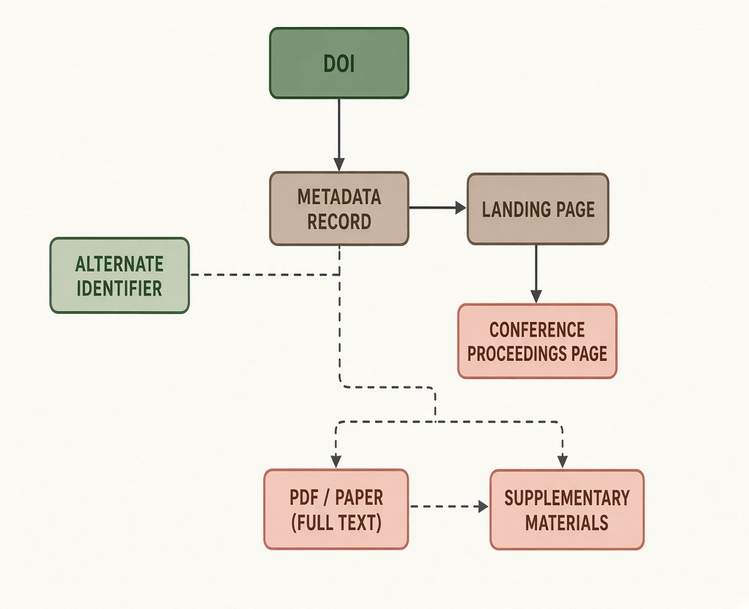
Printing an identifier string on the first page of a downloadable PDF does nothing on its own. A proceedings DOI is functional only when following the link loads a dedicated page showing the exact paper details, and querying the registration system returns matching bibliographic fields.
How a Conference Paper Reaches Crossref
Getting a paper from camera-ready acceptance to a live, resolvable record follows a strict production sequence. Publishers and registration services manage the technical deposit, while authors verify the resulting output.
The Production and Deposit Sequence
First, the editorial team finalizes the paper and locks the bibliographic details, including the title, author order, and pagination or article number. Next, the production team establishes the publication landing page on the hosting platform and assigns a unique DOI to the contribution. With the destination online, the depositor submits the structured metadata record to Crossref through its supported deposit workflow.
You do not need to write or inspect raw XML to make sure your paper is registered properly. Registration services and modern publishing platforms generate these structured records automatically from their editorial databases. Once the depositor submits the batch, the system returns a deposit response confirming whether the records processed cleanly or flagged a conflict. As the final step in production, the team tests the resolved link to confirm that the central resolver redirects smoothly to the live publication page.
Timing matters during this workflow. If a production team embeds a draft identifier string into the downloadable PDF before locking the landing page address, any late change to the numbering pattern leaves a permanent mismatch between the text inside the PDF and the live registry.
Where the Author Steps In
Because only the organization that controls the registrant prefix can transmit files to the registry, an author cannot alter a Crossref record directly. Your practical contribution is inspecting the published page as soon as the proceedings volume launches. If you spot a misspelled surname or a broken redirect, report the discrepancy to the proceedings editor or publisher so they can transmit an updated metadata deposit.
Check the Fields That Identify the Right Paper
Once the proceedings organizer announces that the volume is online, a quick three-way comparison between your camera-ready PDF, the web landing page, and the citation export reveals whether the metadata record reflects your work accurately.
| Metadata Field | What to Compare | Why the Match Matters |
|---|---|---|
| Paper Title | Compare the title on the PDF header against the landing page heading and exported citation file. | Exact title strings prevent duplicate entries in reference managers and automated literature aggregators. |
| Author Names and Ordering | Verify given names, family names, diacritics, and the exact sequence of co-authors across all views. | Downstream citation trackers rely on exact sequence and field separation to credit the right contributors. |
| Proceedings Title | Confirm that the container field lists the formal proceedings volume title rather than a track or session heading. | Entering a topical track name fragments citations across multiple apparent venues in bibliographic records. |
| Publication Date | Distinguish the formal publication date of the proceedings from the calendar dates of the conference meeting. | When a late-year conference publishes its volume the following year, the formal publication date governs the citation record. |
| Page Range or Article Number | Match the pagination or electronic article identifier on the PDF against the landing page summary. | Accurate locators allow library link resolvers and reference tools to distinguish adjacent papers in the same volume. |
| Paper DOI | Check that the string printed on the article matches the permanent link displayed on the web page. | A single character difference between the printed PDF and the registered record breaks automated lookups. |
| Landing-Page URL | Follow the resolved link and inspect the destination address in the browser bar. | The link must land on the permanent publication page for that specific paper rather than a temporary conference schedule. |
Beyond these core bibliographic identity fields, check whether the publisher captures supplementary contributor details such as ORCID identifiers and institutional affiliations. While your paper's title, pagination, and venue define the document itself, linking an authenticated ORCID identifier in the deposit metadata ensures that automated profile systems connect the publication to your personal scholarly record even if your institutional affiliation changes later.
How Correct Records Support Citations and Discovery
Clean metadata does much more than format a bibliography entry. When a publisher deposits structured bibliographic fields alongside a paper's reference list, registration systems match those cited references against existing registry records. This automated matching builds reciprocal links between citing and cited works, allowing discovery platforms to show who has built upon a communication protocol or machine learning model since the conference ended.
To evaluate how a paper circulates online, it helps to separate four distinct mechanisms that researchers often blend together:
- DOI resolution is the basic redirection service that sends a browser from an identifier link to a current web address.
- Bibliographic discovery happens when search portals, library catalogs, and academic aggregators harvest deposited metadata so readers can find the paper by topic or author.
- Citation linking connects references across different publishers using matched identifier records.
- Database indexing is the independent curation decision by an external abstracting and indexing service to include a specific proceedings volume in its collection.
Keeping these functions distinct sets clear expectations for authors and program committees alike. A DOI does not guarantee database indexing, peer review, or full-text access. Always check the relevant database record or landing-page access route directly to confirm whether a proceedings volume is indexed in a specific service or available to read without a subscription.
When an error does surface after launch, the repair path depends on what needs fixing. Routine metadata corrections—such as fixing a garbled abstract, adding a missing page range, or updating a moved landing-page address—take effect as soon as the publisher submits a re-deposit to the registry. By contrast, alterations to the scholarly content or changes to the authorship list of the published PDF require formal post-publication correction notices or errata according to the publisher's editorial policy.

Walk a Wireless-Network Paper Through the DOI Check
To see how this verification works in practice, walk through a quick audit using a working paper title: Latency-Aware Routing in Wireless Sensor Networks (Hypothetical example). Whether you are checking your own newly published contribution or verifying an unfamiliar reference before citing it in a submission, the same checks apply.
Confirming the Destination
Start by copying the DOI link from the first page of the PDF or from your bibliography draft and opening it in a browser. Watch where the redirect lands. You want the destination page to display Latency-Aware Routing in Wireless Sensor Networks as its main heading, accompanied by the specific author list and abstract for that paper.
If the link drops you onto a general conference welcome portal or an overarching table of contents listing fifty different papers across multiple data mining and communications tracks, the identifier is pointing to the wrong level of the publication. Once you confirm that the browser has reached the dedicated paper landing page, hold the downloaded PDF side by side with the web display. Check that the exact wording of the title, the sequence of authors, and the page numbers or article locator match identically across both views.
Paper DOI Versus Volume DOI
Volume Identifier Pitfall: Many proceedings volumes display two separate identifiers on the web page or in the PDF running headers—one for the entire edited volume and another for the individual chapter or paper. Always copy the paper-level identifier when building a reference entry.
Distinguishing between a paper DOI and a volume DOI prevents one of the most frequent citation errors in conference publishing. Publishers regularly assign a single overarching identifier to the whole proceedings book while assigning distinct identifiers to every accepted paper inside it. Some document templates even print the volume identifier in the running footer of every page alongside the book's ISBN.
You can spot the difference by looking at the label next to the link on the landing page or by testing both strings in a new browser tab. The volume DOI resolves to the proceedings front matter, editors' preface, and full table of contents. The paper DOI resolves directly to the abstract and download button for Latency-Aware Routing in Wireless Sensor Networks.
You click the paper-level link from your reference manager, watch the browser land directly on the dedicated article page with every co-author name and page number matching the PDF on your screen, and paste the verified string into your manuscript knowing any reviewer who follows it will reach the exact work you cited.